How to log a found treasure?

You stumbled on a treasure on your walk. Maybe it was a painted stone on a park bench, a small charm tucked into a tree hollow, or a tag with a six-character code. Now you want to let the creator know it has been found. Here is exactly how to do that in the GeoTraders app.
Open the app
At the bottom of the feed you will see a card that reads “Found a treasure? Tap here to log it.” Tap it.

Type in the treasure’s 6-character code
You will usually find the code on a small tag attached to the treasure, or written directly on the object itself. The app starts searching as soon as you enter all six characters, and the matching treasure will appear right below the input.

Open the treasure and tap “Log find”
Tap “Open treasure” on the result card to jump to the treasure’s page.

From there, tap “Log find” (or Pick up from holder).

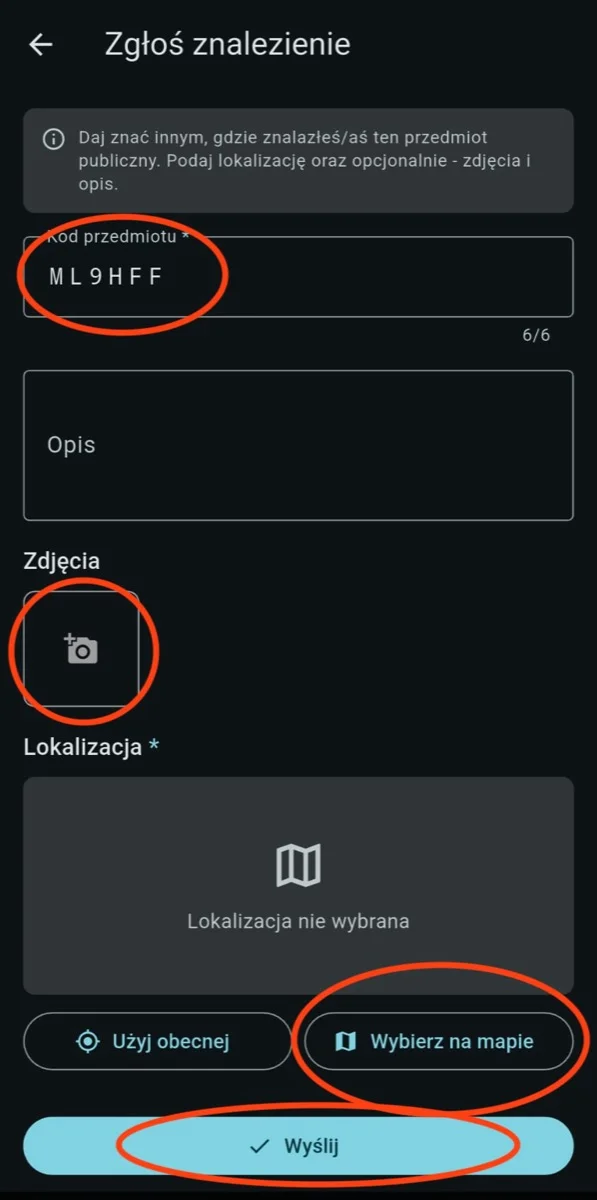
Step 4. Fill in the details
Add a short description of where and how you found it, attach a photo or two so the creator can see it in the wild, and — if the treasure is public — mark the spot where you found it on the map.
That’s it
Your find is now part of the treasure’s story, the creator gets a notification, and anyone following the treasure can see where it has been. If you are picking the treasure up and carrying it with you, you can keep logging new locations along the way — every stop adds another chapter.

What’s next?
Move the treasure somewhere new, let it travel and bring the joy of discovery to the next person. If the treasure is public — leave it in plain sight. If it is hidden — tuck it away well and add hiding hints in the app.